Taskbar (technical)
Turns COSMIC’s “Minimized Windows” panel applet into a Windows-style taskbar for the current
workspace. Built from System76’s source with the patches in taskbar/patches/, installed per user.
User overview: taskbar/README.md.
Upstream, the minimize applet lists only minimized windows, from every workspace, and the App List
groups windows by app. The patches change the minimize applet (binary
cosmic-applet-minimize-ws) and the App List (binary cosmic-app-list-ws). Internal names
(binaries, config folder, cache and state folders, systemd units) still say minimize-ws.
What it shows
- One item per window on the active workspace (same rule as the App List’s
filter_top_levels = Some(ActiveWorkspace); with several monitors: the active workspace of any monitor). Open and minimized windows both stay listed. - Top/bottom panel: app icon (80 % of the panel icon size) and window title (14 px; the second
line 12 px at 75 % of the text colour). The app suffix like “ — Mozilla Firefox” is dropped from
the title. The focused window has a solid background, by default the accent 30 % darker with the
theme’s accent button text colour (
colorsfile). Left and right panels show square icon items: see Side panel. - Width: an item is as wide as its icon and title need, between 120 and 220 px. Widths move in
20 px steps and shrink only once the title is a full step shorter, so a spinner or a small title
change does not shift the taskbar (
item_width.rs; measured only when the rows change). - Limited space: the widest items shrink first, down to 120 px; only then do the rest go to the
overflow popup (the arrow), which lists them as the same items, 300 px wide, one below the
other, with the hover preview beside them. A press on the panel closes the popup. The taskbar
fills the space the panel gives it to within a few pixels: spare room of more than about 84 px
makes the panel grow the applet again, which with whole-item steps made it flicker between all
items and the arrow.
build.shsetsX-OverflowMinSize=4(one item plus the arrow) in the desktop entry. - A second line under the title, from the first source that has something, in this order:
- the app’s own data: Firefox and COSMIC Terminal (terminal-tabs) “N tabs”; COSMIC Files (files-tabs) “N tabs”, or “M items” with one tab;
- the app’s Unity LauncherEntry signal: busy operation, progress,
x-detail, unread count (launcher-entry); - the app’s media player (MPRIS): “▶ Title – Artist” or “⏸ …”. With several windows of the app, only the window of the player’s pid, else the window whose title contains the media title (the focused one when several do); none when no window shows it. One player can serve all windows of an app (Firefox has one per process), so the focused window is not a guess;
- a count at the start of the title,
(3) Chat→ “3 unread” (the title keeps the prefix when a higher source wins); - the last part of the title after ` —
,– ` or ` -: VS Codemain.rs — my-projectgivesmain.rs/my-project`.
With none of these, a title too long for one line continues on the second line in its style (
title_rows.rs): split at the last word that fits, measured with the panel font at layout time.Rules 2-5 work for every app with no setup.
~/.config/minimize-ws/detailturns rules off per app:<app-id> -launcher,-media,-count,-split,#comments, re-read on change.second_line = falsein theoptionsfile turns the second line off for every app: each item shows its title on one line, centred like a short title, and a long title is cut with “…” instead of going on over a second line. A tab count (Firefox, Terminal, Files; rule 1 with more than one tab) moves before the title as(6) Notes — project board; everything else of the second line is dropped.
What it does
- Click raises a window. Clicking the focused window minimizes it.
- Middle-click closes the window.
- Right-click menu: the app’s desktop actions (Firefox: New Window / New Private Window), or “New window”; then Minimize/Restore, Maximize/Unmaximize, Close window.
- The menu also has “Move to workspace ›” (patches 0003 and 0015). It switches the same menu to
every workspace, with “‹ Back” on top; picking one moves the window. The window’s own
workspace stays in its place in the list, in accent colour with a check mark and not
clickable (patch 0032), so the entries never shift. A named workspace shows its name, an
unnamed one “Workspace N”. Names come from COSMIC: see Workspace names. The
entry needs
zcosmic_toplevel_manager_v1v4 and themove_to_workspaceormove_to_ext_workspacecapability; cosmic-comp handlesmove_to_ext_workspacebut advertises only the old one (patch 0014). - With Workspace Keeper installed, the menu also has “Always open on
“
”" (patch 0045): it pins the app to the workspace its window is on now, so Workspace Keeper opens the app's new windows there. For a pinned app the entry reads "Stop opening on “ ”" and removes the pin. The taskbar only writes the rule; Workspace Keeper does the moving. The entry is hidden when the window has no app id or `~/.local/bin/ws-keeper` is missing. See [Workspace pins](#workspace-pins). - App List (patch 0005): an app icon in COSMIC’s App List (pinned or running) is hidden while the
app has a window in this taskbar, i.e. on the active workspace and not in the ignore file. It
shows again when that window closes or moves away. Pinned order and the pinned config are
unchanged. Only active while the taskbar runs: it writes its pid to
$XDG_RUNTIME_DIR/minimize-ws/taskbar.pidand the App List checks that pid every 2 s (patch 0013). The dock runs the same App List, so it hides the same apps. When the taskbar shows every app, the App List has nothing left to show. It then takes no panel space instead of showing its own icon, and comes back when a favourite is not running (patch 0046). - Hover: preview popup with the window title after 0.12 s, at once when you move on from another item within 0.7 s. The preview is live while hovered: one capture session for that window, shm, at most 5 frames/s, stopped on leave. Minimized windows show their last picture.
Side panel
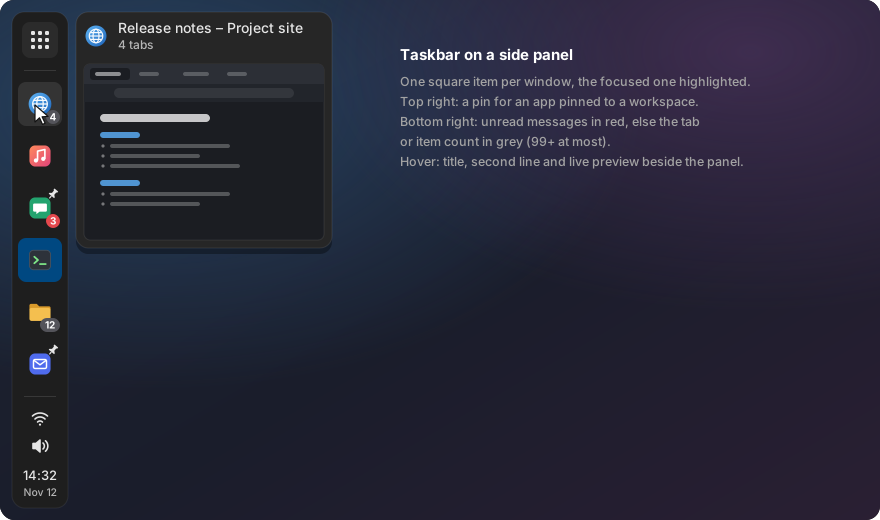
Less tested than the top and bottom panel: we do not use a side panel every day, so bugs there are less likely to be noticed by us. Please report what you find.
On a left or right panel (patch 0047) each window is a square item with its app icon, as large as the panel’s icons. The focused window gets the same solid background as on a top or bottom panel. Two badges sit on the item:
- Pin, top right: the app is pinned to a workspace (see Workspace pins).
- Count, bottom right: the unread count in red, from the app’s LauncherEntry count or a
(3) Chatstyle title; without one, the tab or item count of the second line (Firefox, COSMIC Terminal, COSMIC Files) in grey. Above 99 it reads99+. Thedetailfile’s-launcherand-countrules turn the unread sources off per app, as for the second line.
Hovering an item opens a card beside the panel (right of a left panel, left of a right panel),
centred on the item: the app icon, the title and the second line in the item styles above the
live preview. It moves from item to item like the preview popup on a top or bottom panel, and a
click on the item raises the window. With hover_preview = false the card shows only its header
and no window is captured; with second_line = false the header has only the title (the badge
keeps the count).
Windows that do not fit go to the overflow popup as the same square items, with the card beside them. Tab files, launcher entries, media players and the pins file are read on side panels too.
Code: side_item.rs (badge choice, square layout, unit tests), the Header card in
preview.rs, and side_item() in lib.rs.
How it works
- Window and workspace state comes from the applet’s Wayland subscription
(
wayland_handler.rs,wayland_subscription.rs); live frames fromwayland_handler/live_capture.rs; the popup frompreview.rs. - One popup surface for all items: when the pointer moves to the next item the popup is moved
(
xdg_popup.reposition) and shows the new title and image; it is destroyed 0.1 s after the pointer left the taskbar, and recreated between the panel and the overflow list. Destroying and creating it per item made cosmic-comp logFailed to render texture ..., import for wrong devices(it draws a destroyed surface for one more frame, after its texture is released). State machine and tests:preview::Popup. - Every capture is logged at info level (
capture start kind=live|thumbnail id=N window=… size=… buffer=shm …,capture end … reason=…) for crash diagnosis: the journal shows whether a preview was being captured when something went wrong. Buffers are shm; cosmic-comp does the GPU readback. - Firefox tab counts (
firefox_tabs.rs): the applet reads the session filesessionstore-backups/recovery.jsonlz4(Firefox rewrites it about every 15 s) of every running profile (Firefox keeps alocklink to<host>:+<pid>in the profile folder while it runs; a crash leaves it, so the pid must be running), else of the profile written last; a file that cannot be read is left out and read again on the next change, decodes mozlz4 and counts tabs per window. A window is matched by its selected tab’s title; a new or blank tab matches the bare window title “Mozilla Firefox”. A window whose selected tab has no page stays in the list with no selected title, so its tabs are not taken for another window’s. - Blank Firefox tabs: Firefox stores the page
chrome://browser/content/blanktab.htmlwith that URL as its title, while the window title is “Mozilla Firefox”; a blank page with an empty title or its URL as title counts as “Mozilla Firefox”. - A window that switched tabs since Firefox last wrote the file: no session window has its title as selected tab. It takes a session window whose selected tab no window shows any more, but a window left after that file was written (else it may be a window closed since), and whose pages include the window’s title, if that is the single best such window by the score below; else it keeps its last count.
- A blank window takes only the session window it took before: blank tabs are in many windows, and the file may still list a blank window closed since. A new blank window has one tab, so it shows no count anyway.
- A window keeps the session window it took last (
firefox_tabs::match_windows) while one of the file’s windows still has a page with its title, the one most like it (most pages in common, then the same tab count): a tab switch happens inside the window, so a switch the file does not show yet keeps the window’s own count, and windows with the same title stay apart once they were told apart, also when the file lists them in another order. A window that shows a page none of them has is matched again by title. - Firefox windows with the same selected-tab title (
firefox_tabs::match_windows): each window keeps its last 8 selected-tab titles. Its score for a session window is how many of those titles that window’s tabs have, back and forward history included. A window takes its best session window unless another window wants the same one with an equal or higher score; this repeats until nothing changes. The windows left get the count when the session windows left all have the same count; they keep their last count when the file lists fewer such windows than there are (the file is older than the tab switch); otherwise they get no count and forget their last one, so a count that may be another window’s is not kept. - Private Firefox windows are not in the session file and get no tab count.
- Counts stay with the window (
window_tabs::Remembered, keyed by the toplevel handle): a title often changes before the app rewrites its file (an animated terminal title, a Firefox tab switch up to 15 s early), so a window keeps its last matched count until its title matches again. When the source no longer lists the window for 3 s (window_tabs::GRACE, to ride out a file rewrite), the count goes: no terminal or Files file has its title, also not as a title several windows share, or no Firefox session window is on a page with that title while the window’s own profile file (the one its last match came from; else the oldest file read) was written at least 1 s after the window took its title (firefox_tabs::unlisted). A terminal or Files title that windows with different counts share drops the count at once, as it may be another window’s; windows sharing a title with the same count keep it. - Terminal and Files counts (
window_tabs.rs): the applet reads$XDG_RUNTIME_DIR/cosmic-term-tabs/<pid>.jsonand$XDG_RUNTIME_DIR/cosmic-files-tabs/<pid>.jsonwritten by the patched apps. Files of processes that are gone are skipped; a file is parsed again only when its mtime changed. - The terminal and Files directories are watched with inotify (
tab_watch.rs): a change shows within about 50 ms; if inotify fails the applet logs a warning and polls them every 2 s. The Firefoxsessionstore-backupsdirectories are watched the same way, plus the profile folders for new profiles. Firefox itself writes the file at most every 15 s (browser.sessionstore.interval), so a closed tab shows up to 15 s late; a shorter interval rewrites the whole session file (about 1.5 MB) more often and was not chosen. All of it only on a top/bottom panel and only while such a window is listed. - Media players and LauncherEntry (
media.rs,launcher.rs): one D-Bus watcher, event-driven, no polling. A per-app entry goes to the app’s focused (or last focused) window. Toplevels carry no pid, so a player is matched by itsDesktopEntryor bus name. All sources map to oneStatus; precedence and labels are indetail.rs. - The patches also enable libcosmic’s
desktopfeature, which the applet needs when built on its own.
Installed files
taskbar/build.sh (run by ./install.sh taskbar) installs:
| Path | What |
|---|---|
~/.local/bin/cosmic-applet-minimize-ws |
The patched taskbar applet |
~/.local/bin/cosmic-app-list-ws |
The patched App List |
~/.local/share/applications/com.system76.CosmicAppletMinimize.desktop |
Copy of the system entry with Exec= pointing at the patched applet. A user entry with the same id overrides the system one, so the panel config is unchanged and no system files are touched. |
~/.local/share/applications/com.system76.CosmicAppList.desktop |
Same override for the App List |
~/.local/state/minimize-ws/built-commit |
Upstream commit the applet was built from |
~/.cache/minimize-ws/cosmic-applets |
Upstream source clone |
The installer also sets up the daily update check:
| Path | What |
|---|---|
~/.local/lib/minimize-ws |
Link to taskbar/ in the repo checkout |
~/.config/systemd/user/minimize-ws-check.timer |
10 min after the session starts, then daily |
~/.config/systemd/user/minimize-ws-check.service |
Runs taskbar/check.sh |
./install.sh --uninstall taskbar removes these. The settings files in ~/.config/minimize-ws/
are kept.
Workspace names
COSMIC names pinned workspaces from name: Some("…") in
~/.config/cosmic/com.system76.CosmicComp/v1/pinned_workspaces (cosmic-comp, no settings UI
yet). The panel’s workspaces applet, the overview and this taskbar show the name. The compositor
reads the file at login only, and rewrites it when a workspace is pinned, unpinned or moved: edit
it, then log out straight away. The file is tied to the monitor it was written for. Example names:
Mail, Web, Code, Music.
Workspace pins
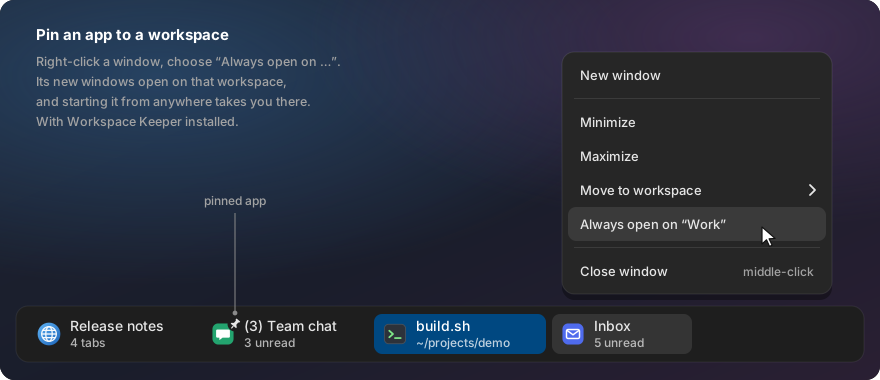
The pin entry in the window menu edits Workspace Keeper’s pins file,
$XDG_CONFIG_HOME/ws-keeper/pins (default ~/.config/ws-keeper/pins): one rule per line,
app_id = Workspace Name, split at the first =, # comments, the last rule for an app wins.
A pin from the menu replaces or removes that app’s rules, keeps every other line and comment,
adds a new rule at the end, and writes the file through a temporary file and a rename. A write
error is logged with the path. The name is the workspace’s name, or its number for an unnamed
workspace; numbers move when COSMIC removes an empty workspace, so pin named workspaces (see
Workspace names). Example:
# apps that always open on one workspace
teams-for-linux = Work
org.example.Mail = Mail
On a top or bottom panel, items of pinned apps carry a small pin (the theme’s pin-symbolic,
12 px, in the item’s text colour) on the top right of their icon; on a side panel, on the top
right of the square item. It shows only with Workspace
Keeper installed and the icon in the theme. The taskbar reads the file every 2 s when it changed,
and at once after its own menu wrote it, so hand edits show too.
Workspace Keeper does the moving: a pinned app’s new windows go to its workspace, and starting a pinned app from another workspace takes you there (see Workspace Keeper).
Code: pins.rs (parse and write, unit tests) and the menu and item code in lib.rs.
Configuration
All files are optional, live in ~/.config/minimize-ws/, and are re-read on change (inotify on
the folder; a 2 s poll if inotify fails).
ignore: app ids never shown, one per line, # comments. Both applets read it. Example:
# keep the music player out of the taskbar
org.example.MusicPlayer
sizes: item widths in px, key = value, # comments. Missing keys keep the defaults; a bad
line is logged and skipped:
item_width = 220             # widest an item gets
item_min_width = 120         # narrowest before the overflow popup
overflow_item_width = 300
fit_to_title = true          # false: every item item_width wide
fixed_width_apps = firefox   # these apps always item_width (space or comma separated)
fixed_width_apps ignores case and a .desktop suffix; several lines add up.
colors: colours of the focused window item, key = value. A comment is a whole line or follows
a value after a space. Missing keys keep the defaults; an invalid value is logged with its key and
that key keeps its default:
focused_bg = system       # system: the theme's accent; or #RRGGBB
focused_darken = 0.3      # 0 to 1: how far focused_bg is mixed toward black (0 = unchanged)
focused_text = system     # system: the theme's accent button text colour; or #RRGGBB
detail: second-line rules turned off per app, one app per line,
<app-id> -launcher,-media,-count,-split, # comments. See What it shows.
options: parts of the taskbar turned on or off, key = value, # comments. Missing keys keep
the defaults; a bad line is logged with its key and skipped:
second_line = true       # false: title on one line, a tab count as "(n) " before it
hover_preview = true     # false: no preview popup on hover, also in the overflow popup (side panel: the card keeps its header)
hover_preview = false also stops every window capture for the preview: no live capture, and
no thumbnails, on any panel.
Click, middle click and the window menu are unchanged. Turned back on, a window has a thumbnail
again after its next capture (minimized, or losing focus).
Commands
Build prerequisites (the installer offers to install them):
sudo apt install libxkbcommon-dev libfontconfig-dev libfreetype-dev libwayland-dev pkg-config
curl --proto '=https' --tlsv1.2 -sSf https://sh.rustup.rs | sh -s -- -y --profile minimal --no-modify-path
./install.sh taskbar                 build + install + reload the two applets (the panel keeps running)
./install.sh --uninstall taskbar     back to the system applets
taskbar/build.sh                     the build-and-install step alone
taskbar/build.sh --uninstall         the uninstall step alone
taskbar/check.sh --print             the daily check, printed instead of notified
build.shbuilds the upstream commit the series was tested on (taskbar/patches/BASE) with the patch series, whatevercosmic-appletsversion is installed, see patch series. When Pop!_OS has a newercosmic-applets(the last part of its version, e.g.1.11.0~1794508896~24.04~ecb6b61givesecb6b61), the build prints one notice and still builds the tested base. An install older thanBASEstops with a hint to update COSMIC. The first build takes several minutes.- The panel does not restart an applet that exits, so
build.shreloads the two applets withlib/panel-reload.sh: it takes them out of the panel config for a moment and then restores the config byte for byte. The panel itself keeps running. - An apt update of
cosmic-appletsneeds no rebuild: the applet is its own process and does not have to match the installed package../install.sh --updatebrings the patches to a newer base when a release of this repo moves them.
Update check
check.sh (daily timer) sends a desktop notification when:
- The taskbar patches moved to a new base (
taskbar/patches/BASE, after agit pull) but the applet was not rebuilt yet. A newercosmic-appletsfrom apt alone is no reason to notify. - System76 changed
cosmic-applet-minimizeorcosmic-app-liston upstream master since the base commit. Each new upstream change is announced once (~/.local/state/minimize-ws/seen-upstream). - One of the two patched applets panicked or hit a Wayland protocol error since the last check
(read from the user journal; the first run looks back one day,
~/.local/state/minimize-ws/errors-sinceholds the last check). - The same for the patched terminal, file manager, Text Editor and tray applet (only for those that are installed).
Limits
- No preview of the real window on the desktop (Aero Peek): COSMIC has no protocol for it.
- Firefox windows with the same selected-tab title and different tab counts get no tab count when they were never told apart and the titles they showed before do not tell them apart (often several “New Tab” windows just opened, or two windows on the same page right after the applet started, before either showed another page). The session file has no window id, and the order of its windows is not tied to the order the compositor lists windows in, so nothing else breaks the tie.
- A paused or playing video in a Firefox tab that is not the selected tab of its window shows on no item when the app has several windows: the media player names no window, and no window title shows the media title.
- A Firefox window that switches to a page none of its tabs had in the last session file (a new page) is matched again by title, and for up to 15 s can show the count of another window whose selected tab had that title.
- With several Firefox profiles running, a window never matched waits for every running profile to write its session file before a count whose page is gone is cleared.
- A blank Firefox window with several tabs shows no count until it was matched once on another page, e.g. right after the applet starts.
- Rust unit tests cover tab counts, the ignore file, title shortening, workspace labels, the move capability check, the workspace pins file, the live-preview frame pacing and the side panel badges. The UI, previews and menu are tested by hand. See testing.